
Working from home only pays off if your setup actually works for you. A cluttered desk, an aching back by 3pm, or a laptop screen you’re hunching over all day quietly drains your focus without you noticing. These 10 home office desk gadgets, chosen for genuine usefulness rather than novelty, cover the desk problems that come up again and again for UK-based remote and hybrid workers.
In this guide:
- Quick picks by category, so you can jump straight to what solves your specific problem
- All 10 gadgets ranked by genuine impact, not novelty
- What to actually check before buying each category
- A buying order if you’re building a home office from scratch
Quick picks: best desk gadgets at a glance
| Category | Pick | Why |
| Ergonomic office chair | Herman Miller Aeron | The gold standard, expensive but built to last a decade |
| Budget office chair | IKEA Markus | Solid back support at a fraction of the price |
| Neck strain fix | Adjustable laptop stand + separate keyboard/mouse | Biggest impact for the lowest cost |
| Noise-cancelling headphones | Sony WH-1000XM6 | Adaptive ANC, strong call quality, comfortable for long wear |
| Digital notepad | BOOX Note Air5 C | Paper-like e-ink writing with cloud sync |
| AI meeting recorder | HiDock H1E | Desktop dock with built-in transcription and noise cancellation |
1. Advanced Cable Management System
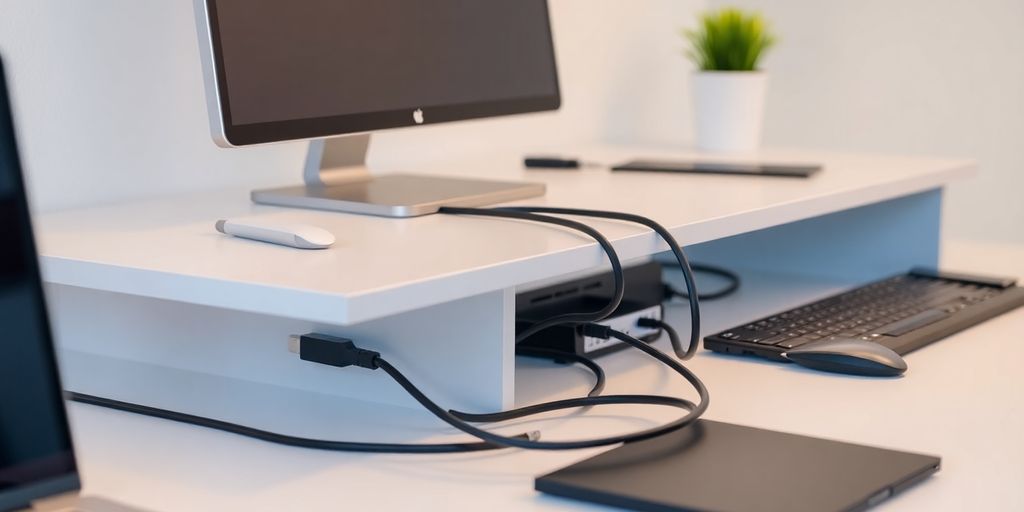
A desk covered in tangled cables isn’t just an eyesore, it makes cleaning harder and increases the odds of yanking something loose mid-call. A few cheap fixes solve most of it:
- Cable trays that clip under the desk and hide the mess entirely
- Cable clips stuck to the desk edge to stop cords sliding down behind it
- A cord organiser box behind your monitor to corral power bricks and adapters
- Reusable Velcro cable ties instead of single-use plastic zip ties
None of this needs to be expensive. A basic under-desk tray and a pack of cable clips costs under £15 and solves most of the problem.
2. Ergonomic Desk Chair
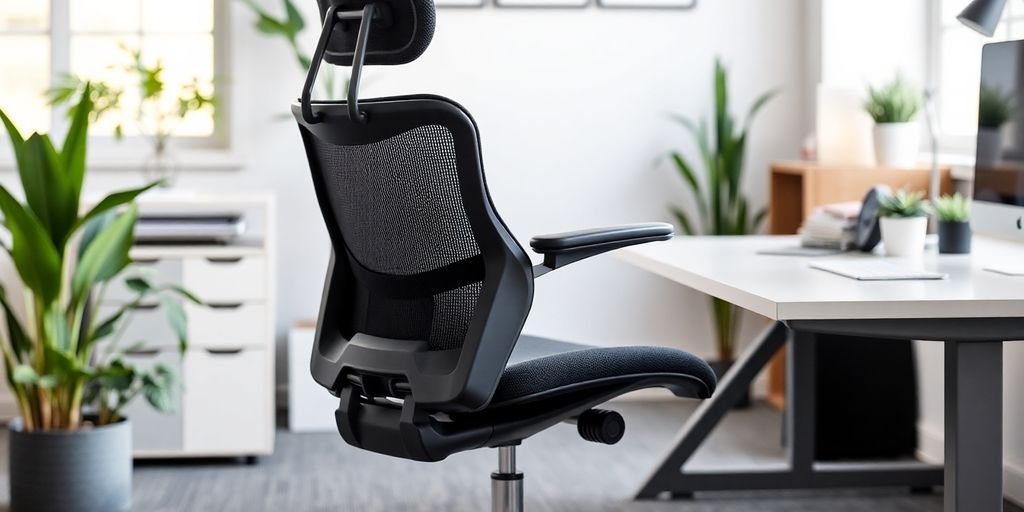
If you’re sitting for six-plus hours a day, this is the one item on this list worth spending real money on for a genuinely ergonomic home office setup.
Herman Miller Aeron remains the reference point most other ergonomic chairs get measured against. Its Pellicle mesh distributes pressure across your body rather than concentrating it, and it holds up for years of daily use. It’s genuinely expensive (upwards of £1,000), so it’s not for everyone.
Worth knowing: the Herman Miller Vantum sometimes gets recommended as a cheaper Herman Miller option, but it’s actually a gaming chair built with Logitech G, designed for a forward-leaning gaming posture. Reviewers specifically note its permanent forward tilt makes it uncomfortable for long desk-work sessions, so it’s best skipped for office use.
If the Aeron’s price is out of reach, look at the Steelcase Series 2 or IKEA Markus, both offer solid lumbar support and adjustability without the four-figure price tag.
What actually matters when choosing an ergonomic chair:
- Adjustable height, lumbar support, and armrests
- Breathable mesh back rather than foam that traps heat
- A stable five-star base
3. Smart Desk Organiser
A desk organiser that also charges your devices earns its desk space twice over. Look for:
- Customisable compartments so you can rearrange it as your setup changes
- Built-in wireless charging or USB ports, so it’s doing two jobs at once
- Material that fits your desk, wood, metal, or moulded plastic
The Moft Snap Desk Mat is a popular current option that combines a wireless charging pad, phone/tablet stand, and organiser tray in one compact mat.
4. Wireless Charging Pad
A wireless charging pad means one less cable to manage and no more digging for the right lead when your phone’s about to die mid-call.
What to actually check before buying a wireless charging pad:
- Charging speed: 15W or higher for genuinely fast charging
- Multi-device support: some pads charge a phone, earbuds case, and watch simultaneously
- Qi2 compatibility, the newer wireless charging standard with magnetic alignment, now standard on most current iPhones and increasingly common on Android flagships
5. Adjustable Laptop Stand
Hunching over a laptop screen for hours is one of the most common causes of neck and shoulder strain in a home office. A stand raises the screen to eye level, and pairing it with a separate keyboard and mouse (rather than typing on the laptop itself) makes the biggest actual difference to posture.
What to look for in a laptop stand:
- Stability, it shouldn’t wobble under a laptop’s weight
- Height and angle adjustment to find your eye-level sweet spot
- Portability if you also work away from your desk sometimes
If you’re on a Mac setup, the Satechi Aluminum Monitor Stand is a well-regarded option that doubles as under-monitor storage.
6. Noise-Cancelling Headphones
With open offices and noisy households both common now, decent noise cancellation is closer to a necessity than a luxury for focused home working.
The Sony WH-1000XM6 (released May 2025, Sony’s current flagship) remains a strong pick: adaptive noise cancellation that adjusts to your environment, solid call quality, and a genuinely comfortable fit for long wear. The Bose QuietComfort Ultra and Apple AirPods Max are the other two worth comparing if you’re deciding between ecosystems. If you’d rather go with earbuds than over-ear headphones, our beginner’s guide to smart tech has specific picks by budget.
What actually matters when choosing noise-cancelling headphones for work:
- Comfort over multi-hour wear, not just in a five-minute shop test
- Call microphone quality, if you’re on video calls often, this matters as much as playback sound
- Battery life, look for 20+ hours minimum
7. Multi-Port USB Hub
Most modern laptops, especially thin ones, simply don’t have enough ports. A hub solves this in one plug rather than constantly swapping cables.
What to check before buying a USB hub:
- USB-C with Thunderbolt or USB 3.2, for genuinely fast data transfer, not just charging
- Power delivery support, if you want to charge your laptop through the hub itself
- Port variety, HDMI, SD card reader, and Ethernet are worth having if you use any of them regularly
Don’t buy the cheapest hub you can find. A hub carrying your monitor, keyboard, and charging all at once is one of the few desk gadgets where reliability really matters, and the cheapest options tend to fail first.
8. LED Desk Lamp with USB Charging
A decent LED lamp does two jobs: reduces eye strain during long sessions and frees up a socket by charging a device at the same time.
What’s worth paying for in an LED desk lamp:
- Adjustable colour temperature, warmer light in the evening, cooler and brighter for daytime focus
- Multiple brightness levels rather than a single fixed setting
- USB-A or USB-C charging port built into the base
9. Digital Notepad
If you take notes by hand but hate accumulating stacks of paper notebooks, a digital notepad bridges the gap. The current model worth considering is the BOOX Note Air5 C, a 10.3-inch colour e-ink tablet with genuinely paper-like writing feel, cloud sync, and handwriting-to-text conversion.
Why a digital notepad is worth it over a regular tablet:
- E-ink display is far easier on the eyes than a backlit screen for long writing sessions
- Searchable, syncable notes, no more losing a physical notebook
- Handwriting conversion turns scribbled notes into editable text
10. AI Meeting Recorder
If you’re in back-to-back calls, an AI meeting recorder genuinely saves time: it records, transcribes, and summarises so you can actually listen instead of scribbling notes.
The HiDock H1E is a current, well-reviewed option: a USB-C desktop dock with a built-in speaker and mic, AI-powered transcription, and noise cancellation on both sides of the call. If you need something portable rather than desk-bound, the HiDock P1 is the pocket-sized version built for the same purpose on the move.
What to weigh up before buying an AI meeting recorder:
- Desktop dock vs. portable recorder, depends whether most of your meetings happen at one desk or you move around
- Transcription accuracy and language support
- Privacy, check where recordings are processed and stored before using it for sensitive calls
Frequently asked questions
Do I need all 10 of these desk gadgets, or just a few?
Just a few. Start with whatever’s actually causing you discomfort or wasted time: a chair if your back hurts, a laptop stand if your neck aches, a cable tray if your desk is chaos. The rest are genuinely nice-to-haves, not essentials.
What’s the single best budget desk gadget for a home office?
An adjustable laptop stand paired with a separate keyboard and mouse. It’s the cheapest item on this list (often under £30 total) and makes one of the biggest differences to neck and shoulder strain.
Is an expensive ergonomic chair actually worth it for home working?
If you’re sitting 6+ hours a day, most days, yes, it’s one of the few items here where the price difference reflects a real difference in daily comfort and longevity. If you’re only at your desk occasionally, a mid-range option like the IKEA Markus is a sensible middle ground.
Do noise-cancelling headphones actually help with focus, or is that overstated?
They genuinely help, particularly in noisy or shared spaces, but the difference between a cheap pair and a good one is significant. Budget noise-cancelling headphones often just muffle sound; better ones create real silence.
Is an AI meeting recorder worth it if I’m only in a few calls a week?
Probably not necessary at that volume, manual notes are fine for occasional calls. It starts paying off once you’re in several meetings most days and are actually losing track of details or spending real time writing summaries afterward.
What should I buy first when setting up a home office from scratch?
In order of impact: a decent chair, an adjustable laptop stand with a separate keyboard and mouse, then a cable management setup to keep the rest tidy. Everything else on this list is an upgrade, not a foundation.